


Leap 7 of the 3rd cycle and here's what Nitwyt is able to do so far (and a special pre-announcement that guides the next growth cycle for Nitwyt).
(Remember if it doesn't seem finished here, it's not. This is the #nitwyt Workbench and where I'm hammering out the exact experience I want from the software.)
Another quick update... cycle 3, leap 6 today.
Here's a small part of the repo that will be released soon (once I get the "developer edition" of the Chrome extension ready for it's debut this Wednesday).
Here 's the prompt that I used to create the .leap.md file that created the whole repo:
[.leap.md[VS[AGENT[GITHUB[(UPDATE)|(CREATE)[REPO[CONNECTED?]]]]]]]
[HILOU^3?[SHIELD[PROVISIONAL[PATENT[STATUS[FILED[PATENT PENDING]]]]]]]
[PROVISIONAL[PATENT PENDING]]
{{THIS IS WHERE I PUT MY PROVISIONAL PATENT}}
[/PROVISIONAL[PATENT PENDING]]
[/HILOU^3?[SHIELD[PROVISIONAL[PATENT[STATUS[FILED[PATENT PENDING]]]]]]]
[/.leap.md[VS[AGENT[GITHUB[(UPDATE)|(CREATE)[REPO[CONNECTED?]]]]]]]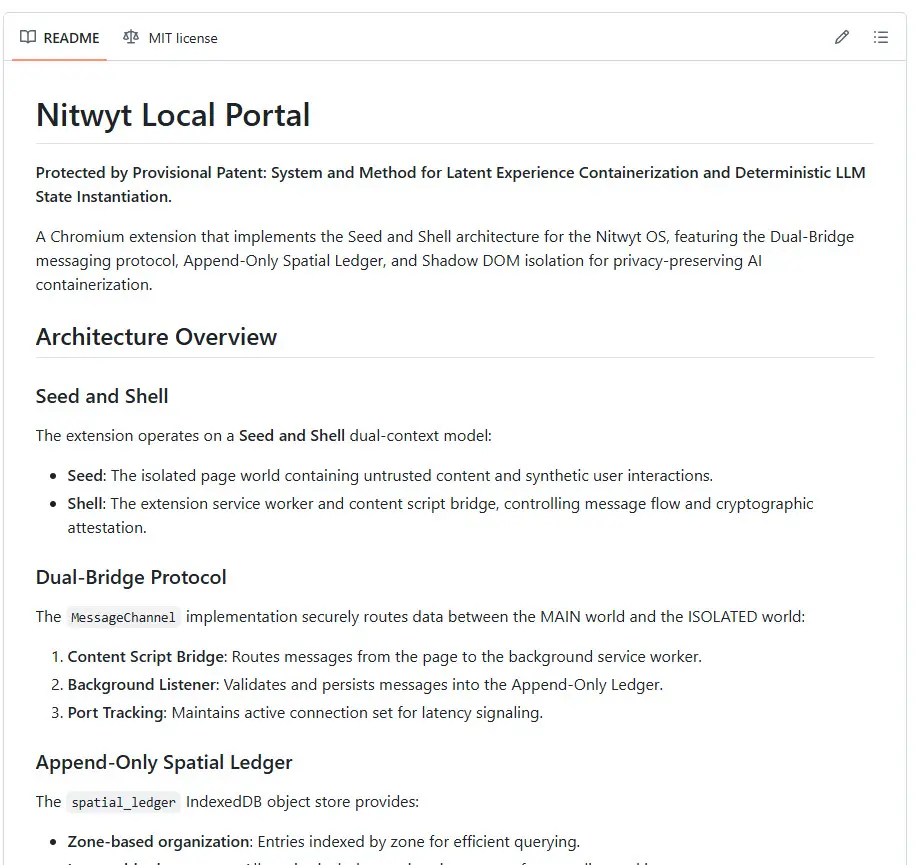
I'm past the halfway point of my third cycle of using LEAP to develop Nitwyt OS (technically day 5/7 in this cycle).
The NotebookLM infographic is the latest attempt from Nitwyt to describe its updated architecture.
So far, so good... things are coming along!
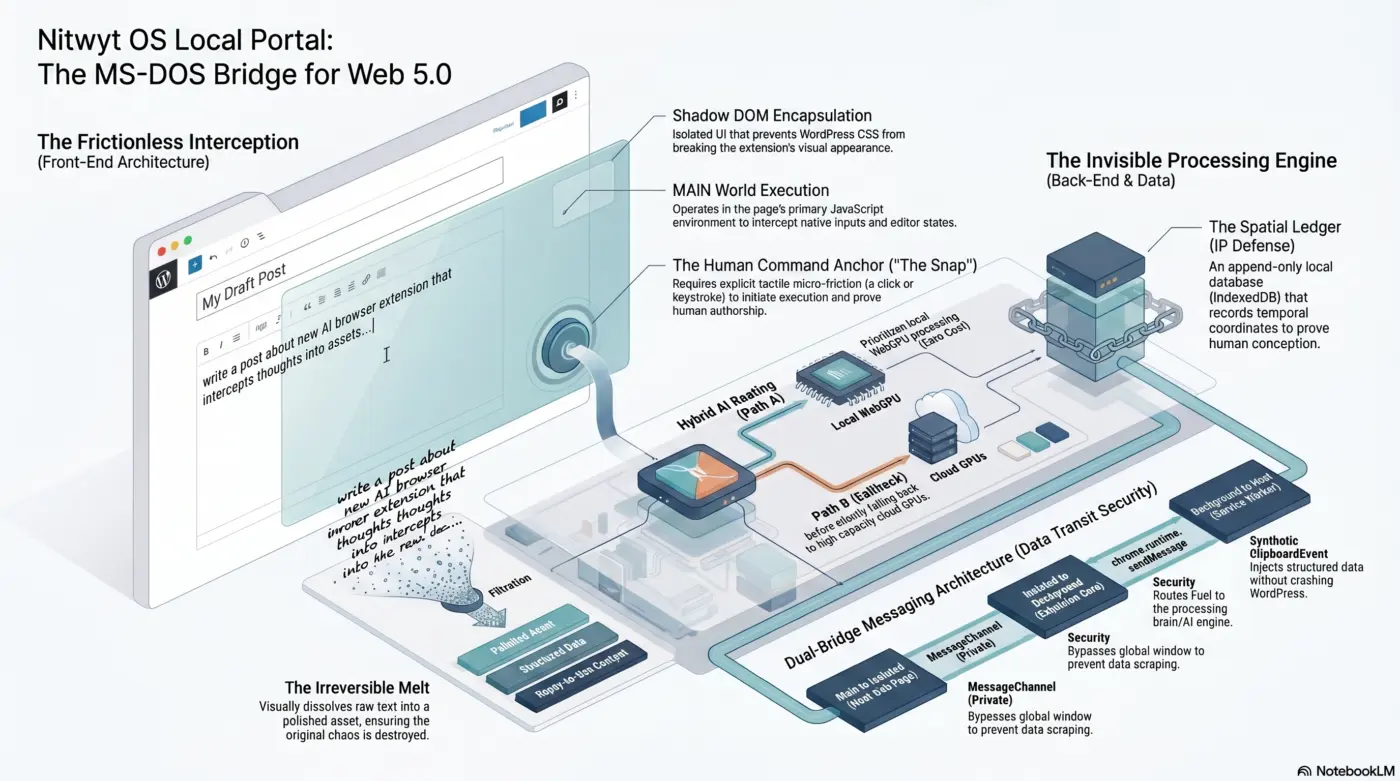
Getting closer to the Nitwyt OS front end experience (latest explainer video attempt is here) because I'm making progress on the backend build (the technical implementation).
The new "Nitwyt OS Developer Kit" (Chrome Extension Version) drops later this week (first to everyone that already has the Digital One Builders Kit, and then for public).
Once I have that released, it'll be easier to see what you can do with .leap.md files (and it'll be MUCH easier for you to join the fun)!
Thanks for hanging in there (especially if you've been following along since the original "7 Day Challenge"!).
While today was mostly focused on the technical backend of the Nitwyt OS Chrome Extension, I wanted to also give you a little more insight into why I prompt the way I do (the same way you saw me use in the first 7 Day Challenge).
In particular, I asked Nitwyt to help you process how it thinks through the logic of prompts that use L.E.A.P. organization.
For example, I often use this "recipe card" for each day...
[EXPERIENCE[HILOU^3?[<LEAP_FILE type="leaplet_session_primer">[CYCLE[X[LEAP[X[GOAL[MAXIMUM[TAM[LEAP]]]]]]]]]]]
📝 What is L.E.A.P.? (Logically Engineered AI Prompting)
When you look at the prompt I shared, it probably looks like a chaotic math equation. But in common sense terms, L.E.A.P. is simply a Recipe Card.
The old way of using AI was to have a messy, back-and-forth conversation with a chatbot, hoping it understood what you wanted (and getting frustrated when it didn't).
L.E.A.P. replaces conversation with perfect structure. The brackets [ ] act like locked boxes. Instead of talking to the system, you are handing it a locked set of instructions. Because the instructions are locked in these brackets, the Silent Partner cannot get confused, it cannot make up random answers, and it cannot talk back. It just reads the recipe and perfectly executes the magic trick.
🔍 Translating the Example Recipe Card
Let's break down the exact command provided into plain English:
[EXPERIENCE[HILOU^3?[<LEAP_FILE type="leaplet_session_primer">[CYCLE[X[LEAP[X[GOAL[MAXIMUM[TAM[LEAP]]]]]]]]]]]
[EXPERIENCE[HILOU^3?]]: HILOU stands for "Highest, Immediate, Logical, Obviously Useful." By putting this at the very front, I am commanding the system: "Give me the absolute best, most frictionless magic trick possible right now. No fluff. Just results."[<LEAP_FILE type="leaplet_session_primer">]: This tells the AI ("Silent Partner) exactly which specific set of rules to read from its memory before it does any work, ensuring it understands my exact context.[CYCLE[X[LEAP[X...]]]]: This is simply a bookmark. It tells the system exactly where I am in the current journey or project so it doesn't lose its place.[GOAL[MAXIMUM[TAM]]]: "TAM" stands for Total Addressable Market, but in common sense, this command means: "Make the final result so simple, obvious, and frictionless that literally anyone could use it without needing a tech manual."
Hope the example helps get you LEAPING!
Today’s backstage broadcast was a massive one for those of you following along with the Nitwyt Stater Kit (a.k.a. "Digital One Builders Kit").
If you watch today's session (Day 63 of my build), you saw exactly how we are using the system to iteratively test and refine the actual "experience" of Nitwyt OS before we even touch the heavy code.
We ran through different video engines today to demonstrate how the core logic of the operating system is evolving.
The first run was good, but it still had some of that technical friction and anxiety—using terms like "melting butter" for privacy. The second run? Better... It completely grounded the experience in the physical reality of the Level 1 user.
We stripped out all the machinery and jargon. We moved to the MS-DOS Pivot: the user just drops their Fuel, selects a Recipe Card, triggers The Snap, and watches the Frictionless Overlay do the rest.
It ends with Engineered Silence and the peace of mind that everything is tucked safely inside their local Digital Backpack. Casual magic at a trillion-user scale. 🤯
The "Build In Public" Insight...
For those of you building alongside me—you're doing it the hard way, but you are seeing exactly how the sausage is made.
If you are starting to wonder where "Recipe Cards" come from, the curtain is officially pulled back: they are just glorified, deterministic prompts (LEAP files) that strip away the endless back-and-forth chatbot hallucination.
We are engineering a closed-loop system that uses AI to automate itself.
And for those wondering what it takes to build this?
I am not using a massive team or VC funding. I'm using Gemini Gems, NotebookLM, VS Code, and Firebase Genkit.
You can build this architecture entirely for free.
You don't need expensive tools to build your own version of what your Nitwyt needs to be.
The Next Leap...
If you are still hanging out in the audience trying to grasp what this is...
Stay right there.
Keep watching.
It will continue to get clearer as the software itself gets better at explaining what it does.
Tomorrow, we move into Leap 3.
I've already got parts of the Chromium extension mapped out, and we are going to start laying down the actual code infrastructure that brings this silent, frictionless experience right into your active browser window.
See you in Leap 3!
Howdy!
I just wrapped up the live session for what's technically another 7-Day "LEAP" Challenge. (I'm calling this one "Cycle 3" because it's the third one I've done in a row.)
The recording is now officially up on the Workbench...
For those of you who have been following along with your Digital One Builders Kit (now the Nitwyt OS Starter Kit), you know we’ve spent the last two cycles laying the invisible groundwork.
Today, we stepped completely out of the engine room and looked at exactly what this feels like from the outside.
We are entirely leaving the friction of Web 2.0 behind and stepping onto the Paved Road. You'll see exactly how the "Frictionless Overlay" works this week during this 7-Day Leap Challenge.
What’s next for you? I am building this in public, week by week, cycle by cycle.
But the Workbench isn't only for watching me... it's for building your Nitwyt OS.
If you are holding your Starter Kit, I want you to party along with us...
Drop your progress on the Workbench. Share your leaps.
Whether you are on your very first leap or you are keeping pace with me in Cycle 3, put it out there.
The goal isn't just to build...
The goal is to claim your afternoon back.
See you for Leap #2 tomorrow!
Welcome to the end of the Ignition Sequence...
Session 7 is officially in the bag!
If you are looking for the full, uncut raw audio of today's stream... well, we have a bit of a situation.
1. Building in Public (And Forgetting the Mic) I made a mistake. I forgot to record the backup audio on my phone, and yes, there is another giant "mute spot" right in the middle of the broadcast. That raw audio is lost forever.
But here is the beauty of what we are building: It's perfectly okay. I did my best, we are moving forward, and the structural logic of Session 7—The Curtain Drop, the Destination Paradigm, and the Waitlist—is already permanently secured in the OS. We build in public, which means you get to see the messy, chaotic human behind the curtain. AI First... Always Human.
2. Multi-Modal Magic (Explainer vs. Cinematic) During the session, I played two distinct types of videos to show you how the system actually orchestrates content:
- The Explainer Video: I wanted you to see how custom audio and custom video prompts can be woven together to dramatically enhance the clarity of the message.
- The Cinematic Video: This one was special. Woven into the cinematic visuals was a very specific message dedicated entirely to our early adopters.
3. ATTENTION: Digital One Builders Kit Owners For the "Level 1" audience, this 7-Day Challenge was about discovering Casual Magic and joining the waitlist. But for you—the master architects holding the Digital One Builders Kit—your real work is just about to begin.
This coming Tuesday, we are kicking off a brand new, specific 7-Day Challenge just for you. We are going to level up. You are going to learn how to actively operate the Large Logical Machine. We will dive deep into advanced B.E.N.T.O. structuring, LLM operation, and how to actually build the nodes that power this ecosystem. You've seen the magic trick; now I'm going to teach you how to build the stage.
Your Next Step: Take a breath and celebrate the completion of the Ignition Sequence. If you have a Builders Kit, get your Workbench organized and rest up for Tuesday.
What was your biggest "aha" moment from these first 7 days? Drop it in the comments below!
AI First... Always Human.
Welcome to Day 6!
If you watch the today's stream, you’ll notice two distinct things right out of the gate...
- A live magic trick
- A totally unforced human error.
Let's talk about the error first.
1. The Mute Button & Your Digital Backpack Yes, true to form, after playing the video for Session 6 I responded with my mic completely muted. But unlike last time, I didn't panic. Why? Because this perfectly illustrates how Nitwyt OS handles memory and human error.
In the old world, a live-stream mistake is just lost data or a ruined broadcast. In our system, the raw audio and the structural text are already safely archived in the Digital Backpack. The machine doesn't care that the human forgot to unmute the mic; the contextual foundation is already perfectly secured and ready to be appended. Mistakes don't break the system; the system just catches them. This is the "Vault of Psychological Safety" in real-time.
2. The Magic Trick (A Self-Updating OS) The real magic of Session 6 happens when I refresh the screen. You literally get to watch me update the system's logic in real-time.
I fed my own frustrations and critiques from earlier today back into the Large Logical Machine. I asked it to rethink its own explanations. When I hit refresh, the UI dynamically updated. You got to hear the older version of the explainer video alongside the newly updated version. You can hear the jargon disappear. You can hear the story solidify. The machine isn't just chatting; it is literally writing its own curriculum based on the structural logic we feed it.
3. The Death of the Attention Economy Session 6 introduces the Community Canvas Drop and the Bento ecosystem.
This is the part I am most excited about. 🥳 We are building an environment where you never have to participate in the "attention economy" or the viral grind ever again. You don't have to be an influencer. You just have to be helpful. 💪 When you drop a perfectly structured, empty "Recipe Card" into the community, someone else inherits your common sense. The ecosystem rewards you with a Bento—a digital token of gratitude. It's a closed-loop system of actual human value, processed entirely locally on your machine.
What's Next: Tomorrow is Day 7. We are dropping the curtain. We will do the final reveal and show you exactly how the waitlist for Personal Nodes will work.
For those of you holding a Digital One Builders Kit, your deep-dive cycle starts next week. You are going to learn the exact architecture required to build what I am building.
Get in the Workbench. Play with the logic. See you tomorrow!
AI First... Always Human.
Welcome to Day 5, Backstage Builders...
If you watch today's raw stream, you'll see we went slightly off the beaten path before diving into the core Session 5 material.
I wanted to show you exactly how a Large Logical Machine operates in the real world, far beyond just writing emails or summarizing PDFs.
1. The Water Softener Blueprint I had a leaking water softener. Instead of treating the AI like a search engine and saying, "Hey, go find me parts for this," I gave it a structural blueprint. It used that blueprint to instruct itself to adopt the identity of a software researcher, prioritize OEM quality, and target single-item purchases.
The result? It didn't just give me a link. It autonomously generated a .leap.md file (its own internal Recipe Card) to define the exact parameters, parsed out the "severe service specifications," and gave me the exact links with the logical reasoning behind each source.
This is what happens when you stop having conversations with a chatbot and start handing a blueprint to a logic engine.
2. The Chatbot Delusion is Costing You Money (Confession: I am completely guilty of this one, too!)
I recently watched a video where a user accidentally called an AI "Claude" instead of its actual name, and then spent a whole paragraph apologizing to it.
We can't really blame the user here. The tech industry intentionally designed these interfaces to look like chat windows, successfully hypnotizing us into treating code like a coworker.
But here is the reality check: Every time you say "please," "thank you," or "I'm so sorry, I meant...", you are paying for the input tokens. And worse, you are paying for the machine's output tokens when it politely replies, "No problem, I understand!"
Treating a logic engine like a human isn't just inefficient; it's a literal financial drain. Use your structural logic. Cut the fluff.
3. Session 5: The Digital Backpack This brings us to the core of today's lesson: Data Sovereignty. If you are going to drop your raw, messy thoughts (your Fuel) into the machine, you need to know it is safe.
Nitwyt is engineered to eliminate the "Privacy Tax." With the Digital Backpack, your data does not get sucked into a corporate server farm. It stays locked to you.
Furthermore, the system is explicitly engineered so you can never make a mistake. Your ideas just stack and evolve naturally, creating a true Vault of Psychological Safety.
ATTENTION: DIGITAL ONE BUILDER'S KIT OWNERS For those using the Digital One Builders Kit, this challenge is the exact architecture you are learning, so you can pilot your own AI Operating System running on the same structure that Nitwyt OS runs on.
(In other words, you'll be able to build what I'm building... but by that time, you will have already thought of something even better to build that works for everyone.)
Tip: If you want to get ahead of the game, start practicing your conversational "BENTO" skills in the Workbench now.
For everyone else... free Nitwyt personal nodes drop in June 2026.
(This challenge is producing the @ThisIsYourMindOnAI content for the launch of the Nitwyt.ai waitlist that goes live next week.) 😅
Looking forward to seeing what you build!
AI First... Always Human.